
With semantic search, a search query can be formulated in natural language – for example, as a complete sentence or question. The search system tries to understand the meaning and context of the query and find relevant content, even if it does not contain exactly the same words.
This type of search is becoming increasingly common, for example in modern search engines and AI-powered research tools. However, many subject-specific databases and library catalogues still rely heavily on the targeted combination of search terms, for example using Boolean operators.
Linking Search Terms: Boolean Operators
The three Boolean operators AND, OR and NOT are used to link different search terms in a search field. These search operators can usually be used in library catalogues and subject-specific databases.
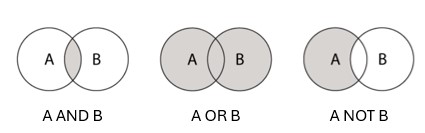
AND is used to narrow a search. It retrieves results in which both search terms appear. In other words, it creates an intersection between the terms. You can combine as many words as needed using the AND operator. In most databases, AND is automatically inserted between two search terms.
Example:
child AND addiction retrieves results in which both terms appear.
OR is used to broaden a search. It retrieves results in which either one search term or the other appears, or where both are present. In other words, it creates a union of the search terms. This operator is especially useful for combining synonyms or related terms.
Example:
addiction OR drugs OR dependency retrieves results containing one, two, or all three of these terms.
NOT is used to narrow a search. It retrieves results that contain the first term but not the second. In other words, it excludes certain results.
Example:
addiction NOT alcohol retrieves results that contain the term addiction, while the word alcohol must not appear.
(In Google, this function is usually expressed with a minus sign: -.)
When using several operators, brackets are used in the same way as in mathematical expressions to control the order in which the search is processed. The operator inside the brackets is considered first.
Example:
handbook AND (addiction OR drugs) retrieves results that contain the word handbook and, in addition, either addiction, drugs, or both terms.
Tip: Some databases offer advanced search forms instead of operators, where you can conveniently select fields and operators.
Phrase Search
A phrase search can be carried out in many databases, library catalogs and discovery systems, and also in Google. The characters entered are then searched for in the exact order given. In most cases, quotation marks must be inserted before and after the terms, sometimes the phrase search can be activated by ticking a box.
Examples:
„Sozial aktuell“ leads directly to the desired journal title
„Mentally ill parents“ yields results in which the exact sequence of characters entered is found, including spaces.
Abbreviation of Search Terms: Truncation
Truncation searches for the root of a word. It is used to extend the search by including other spellings or grammatical forms. Various characters are generally used to deploy truncation, * is very common, but also ?, ! and $. The help section of a given database or search engine indicates which truncation characters are to be used. Search terms can be truncated either on the right, left or in the middle of a term; the use of several truncation characters together in one term most often does not work.
Examples:
child* finds terms such as child, children, childhood, childcare, etc.
*child finds terms such as child, schoolchild, stepchild, etc.
wom*n may find variants such as woman and women, depending on the truncation rules of the database.